Vibrations Are Lying to You: The Psychology Behind Haptic Feedback in Spatial Apps
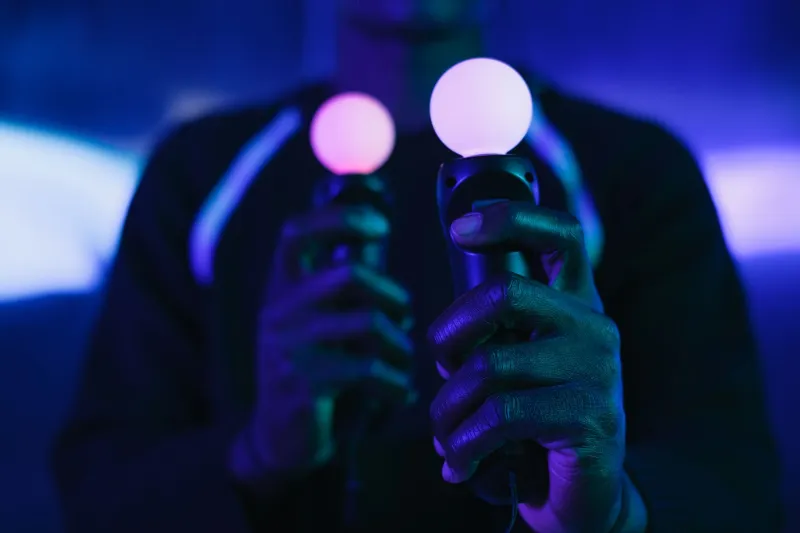
There's a moment every spatial app developer secretly loves: when a user picks up a virtual object, feels that tiny buzz in their controller or fingertip, and their brain just... accepts it. No learning curve. No confusion. The interaction feels right, even though nothing physically moved.
That moment is haptic feedback doing its job. And it's also, depending on how you use it, a small act of deception.
Let's talk about what's actually happening — neurologically, technically, and ethically — when you wire vibration into your spatial experience. Because the line between "enhancing usability" and "masking bad design" is thinner than most developers want to admit.
What Your Brain Is Actually Doing
Haptic feedback works because your somatosensory system is shockingly easy to mislead. When a quick 20-millisecond vibration pulse hits your fingertips at the exact moment a virtual button appears to depress, your brain doesn't process those two signals separately — it fuses them into a single perceived event. Researchers call this "temporal binding," and it's the same mechanism that makes ventriloquism work. Your brain is constantly trying to sync up sensory inputs, and it'll take shortcuts to do it.
In spatial computing, developers exploit this constantly. A virtual drawer that slides open with a low-frequency rumble feels heavier and more substantial than one that opens silently. A UI button that clicks with a crisp, high-frequency tap feels more responsive than one that doesn't — even if the underlying response time is identical. The vibration isn't adding information. It's adding perceived information, which is a very different thing.
Major platforms have been quietly building sophisticated haptic vocabularies around this. Apple's Core Haptics framework, for instance, offers fine-grained control over waveform intensity and sharpness. Meta's controller SDK lets developers layer custom haptic patterns onto interaction events. Google's Pixel lineup uses what they call "haptic symphony" design principles to make system-level interactions feel cohesive. These aren't gimmicks — they're carefully engineered psychological cues.
When Haptics Actually Help
Used correctly, haptic feedback genuinely improves usability in ways that aren't just perceptual tricks. There are three categories where it earns its keep.
Confirmation signals. When a user completes an action — submitting a form, snapping an object into place, crossing a threshold — a well-timed haptic pulse provides confirmation without requiring them to look at a status indicator. This is especially valuable in mixed reality environments where visual attention is split between the physical world and digital overlays. A subtle buzz that says "yes, that worked" is genuinely useful.
Boundary and collision feedback. In 3D manipulation tasks, haptic resistance cues help users understand spatial limits. If you're dragging a virtual panel and it can't go past a certain boundary, a soft "stop" vibration communicates that constraint intuitively. This reduces errors and cognitive load — users don't have to consciously think about why something stopped moving.
Accessibility support. For users with visual impairments or those operating in visually noisy environments, haptic feedback can carry meaning that would otherwise require sight. This is an underused application. If you're not designing haptic patterns with accessibility in mind, you're leaving real usability value on the table.
When Haptics Are Just Covering for Bad Design
Here's where it gets uncomfortable. Because haptic feedback is so effective at making interactions feel better, it's become an easy way to make poorly designed interactions seem better. And there's a real difference.
Consider a spatial UI where gesture recognition is inconsistent — sometimes registering a pinch, sometimes not. Adding a haptic confirmation every time the gesture does register doesn't fix the recognition problem. It just makes the successful interactions feel more satisfying, which can actually mask how often the system is failing. Users feel good when it works and frustrated when it doesn't, but they're less likely to identify the interaction model as the root cause. They blame themselves.
This is the haptic illusion at its most problematic. You're not improving the experience — you're improving the perception of the experience while the underlying issues remain unaddressed. Short-term, users feel better. Long-term, they quietly stop using the app.
The same dynamic plays out with latency. A haptic pulse delivered immediately on input — before the system has actually processed the action — can make a laggy app feel more responsive than it is. This is a technique borrowed from game design, where "input buffering" creates the illusion of snappiness. It's not inherently wrong, but if you're using it to hide a 200ms processing delay instead of fixing the delay, you're building on sand.
The Ethics Question Nobody Wants to Ask
Spatial computing is still a young enough field that its design ethics are being written in real time. And haptic feedback sits in a genuinely gray area.
Is it manipulative to make a mediocre interaction feel premium through vibration? Arguably, yes — especially in commercial contexts where that perceived quality influences purchasing decisions or continued engagement. There's a reason casino gaming machines have historically used tactile feedback to amplify the emotional response to wins. The mechanism is the same.
That doesn't mean haptics are inherently unethical. It means developers have a responsibility to be honest with themselves about why they're adding them. Are you adding haptic feedback because it genuinely communicates something useful to the user? Or are you adding it because the interaction feels incomplete without it — and if it feels incomplete, maybe the interaction itself needs rethinking?
A good litmus test: disable all haptic feedback in your app and see what breaks. If users suddenly can't tell when actions succeed or fail, haptics are doing communicative work. If the app just feels less satisfying but still functions clearly, you might be using haptics as emotional gloss.
Practical Guidance for Developers
If you're building haptic patterns into a spatial web experience, a few principles are worth keeping in mind.
Match intensity to significance. A major action — deleting a file, confirming a purchase — should have a more pronounced haptic response than a minor one. If everything vibrates with the same intensity, the signal loses meaning fast.
Keep latency under 50ms. The temporal binding effect that makes haptics feel real only works when the vibration closely follows the triggering event. Delays beyond ~50ms start to break the perceptual fusion and the feedback feels disconnected and weird.
Design for opt-out. Some users find haptic feedback distracting or even physically uncomfortable, especially during extended sessions. Build in a clear way to disable it, and make sure the experience remains fully usable without it.
Test without haptics first. Build your interaction model to work clearly without any vibration feedback. Then layer haptics on top as enhancement. If you're designing around the haptics, you're probably hiding something.
The best spatial experiences don't rely on haptic feedback to feel real. They use it to feel more real — which is a subtle but important distinction. Get that right, and you're genuinely improving what users experience. Get it wrong, and you're just a very convincing magic trick waiting to be figured out.